Current Release: 3.0.65
Build your set. Time your lyrics. Play your tracks.
Sync your lyrics to your backing tracks and run full setlists for your gigs - all from one place.
What I rehearse at home is exactly what I take to the gig. Same tracks, same lyrics, same audioCue setup — from practice room to live stage.
The Choice of Professional Musicians
Rock-solid from rehearsal to the stage.
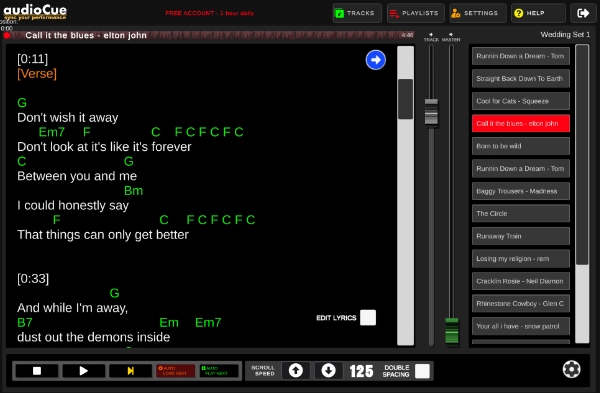
Paste in your lyrics and add timestamps as the song runs. Verse, chorus, bridge - all mapped to your track.
What you rehearse is what you perform.
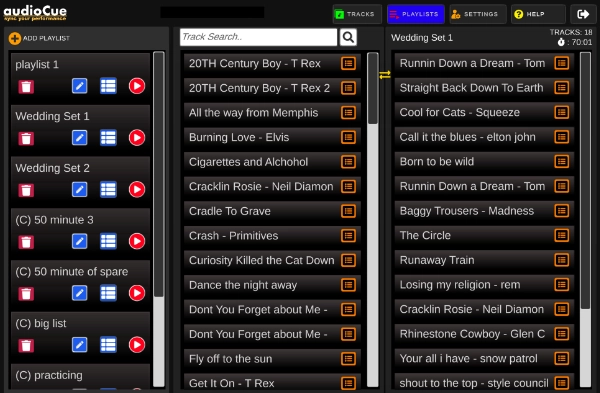
Drag and drop songs to build your set. See your total set length to the second.
Know your timing before you step on stage.
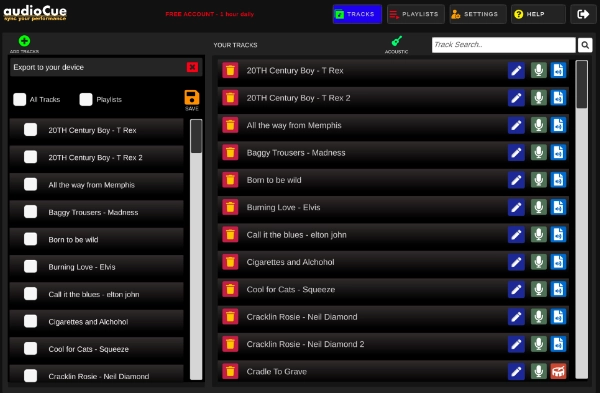
Keep your tracks and setlists in sync across all your devices.
Upload once. Play everywhere.
Mac. Windows. iOS. Android.
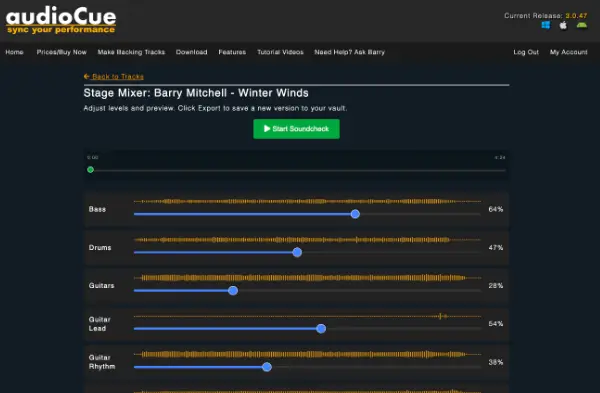
Create professional stage ready backing tracks from any song.
Control vocals and guitar to suit your performance.
Use them directly in audioCue.
Choose your plan and start building your live set today.
Try audioCue with full features for 1 hour per day. Limited daily use to test your setup.
Or £5 per month
Built for musicians using backing tracks live.
No limits, just you, your music, ready to go.
More power to you. Custom options and build features to suit your exact needs.
audioCue is used by thousands of musicians across the world each week for all types and sizes of gigs from small gigs down the local pub to stage shows in Las Vegas. I want to thank everyone who has supported audioCue over the years and I really do appreciate your feedback!
Thomas & Steve Jones - Duo band California
Hi Barry. First up, thank you for building this amazing software! We used printed lyrics sheets for years until Thomas found audioCue.
As a duo band that relies backing tracks, audioCue has streamlined our rehearsals and live performances. I just hook my tablet right up to the PA and its good to go! (purchased a Bluetooth Dongle as you suggested)
Also thank you for helping set up on our tablet. We now have over 100 tracks set out in playlists.
Marc Chauvette - Las Vegas
Hello Baz -
You, my friend are a genius. I've worked as a solo act for 30 years playing keyboard & guitar, with quite large audio outfit.. I'll keep it short, but I have struggled with using a list of audio files on the left side of my screen, and a list of lyrics in the form of text files on the right. Fumbling around has become my Forte. You just reduced my stress level 100%.
I'm grateful to have stumbled onto this little gem. I live in Las Vegas, NV an still entertain quite a bit. I will be sure to pass info on your application to anyone I know who struggles the same way. Peace brother and thank you so much.
Ashley Cummins - Singer from New York
I had used lyrics prompters on my Samsung tablet for years but could never get the music to play in time as I had to switch between the lyrics and the music! audioCue lets me set up everything to match up perfectly and it also plays my MP3 files.
I wish I had found this years ago!
Marcus - Solo Performer from Berlin
audioCue is an absolute game-changer for solo performers like me.
I've ditched my old clunky setup and now run everything through audioCue on my Macbook. The ability to organize playlists and sync lyrics with the tracks has saved me so much time. Also if I have any issues, Barry has always been ready to help out!
Sophia Wedding Singer New York
Playing at weddings means everything has to run perfectly, and audioCue makes that happen for me. I use the app on my iPad, and it handles all my backing tracks effortlessly. The lyrics finder lets me just type the song name and it finds the lyrics every time! It's reliable, easy to use, and has taken so much stress out of my performances.
Liam Smith - Singer, Guitarist from Sydney
Hey Barry, just wanted to give you some feedback about how Im finding the app. Got it up and running in around 10 minutes with a full set list done and dusted. Great piece of kit you made here mate!
audioCue is a live performance app for musicians. It plays your backing tracks and scrolls your lyrics in perfect sync so you don't forget words, miss cues, or lose your place on stage.
AudioCue is quick and easy to pickup. You'll have your first song playing in less than 5 minutes. Plus Barry is always on hand to help with any problems.
AudioCue runs on Android tablets, iPad, Windows and Mac. Whether you're looking for a scrolling lyrics app for Android or a backing track player for your computer, AudioCue lets you rehearse and perform using the devices you already own.
The free version gives you full access to all features for one hour per day. No locked tools. No stripped-down mode. The paid version removes the daily time limit so you can use it as long as you like.
YES. If you look in the top menu of the site, you can see a link to 'Using audioCue'. This has a full set of tutorial videos so you can see step-by-step how to set everything up. Also Barry (founder) is always here to answer support questions so your never left in the dark.
audioCue is built for solo artists, duos, and working musicians who need a backing tracks player and lyrics scroller, but it's just as useful for bedroom jammers, open mic performers, and rehearsals.
You can have a song ready in minutes. Add your track, paste your lyrics, tap in your timestamps in one pass, and you're done.
Yes. You can timestamp your lyrics to your track so they scroll in sync while the song plays. It's designed to be quick to set up and easy to follow on stage.
No. Your songs are stored locally on your device. Once they're added, everything runs offline.
Yes. You can export a single track or multiple tracks in one go, which is handy for moving songs to a new device or keeping a clean backup of your set.
Yes. You can back up your songs and sets so you're not relying on one device. If you ever switch tablets or your device dies, you'e not starting from scratch.
Yes. You can load lyrics only and use audioCue as a clean, distraction-free scrolling lyrics prompter.
audioCue is built from real gig experience.
If your looking to get started using backing tracks for gigs, this guide covers everything you need to get up and running quickly.
Guide to Using Backing Tracks for Gigs
We also have a Facebook group with musicians who play gigs every week so if you need more advice please feel free to join our Facebook Community.
?